


Lighting & Bulbs  Ask about this on WhatsApp

WiFi Smart Bulb
Product code 0029
Sh 40,000.00
In stock in Dar es Salaam
In stock
- Genuine stock. Sourced from authorised distributors, warranty intact.
- Delivered across Tanzania with additional delivery charges.
- Multiple payment options.
Payment Options
- Cash on Delivery. You can pay cash at our store on pickup, or pay the rider upon delivery (Dar es Salaam only).
- Pay by Lipa Number
- M-Pesa

- Mixx by Yas

- Airtel Money

- Halopesa

- Selcom

- M-Pesa
- Pay by Card
- Visa

- Mastercard
- American Express

- Discover

- UnionPay

- Visa
- Pay by Apple Pay or Google Pay
- Apple Pay

- Google Pay

- Apple Pay
16 million
Colours
2700-6500 K
Warm to daylight
No hub
Straight onto Wi-Fi
E27
Standard screw fitting
Alexa + Google
Voice control
About this product
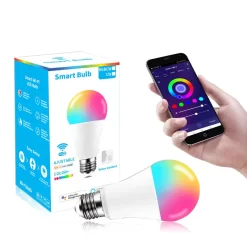
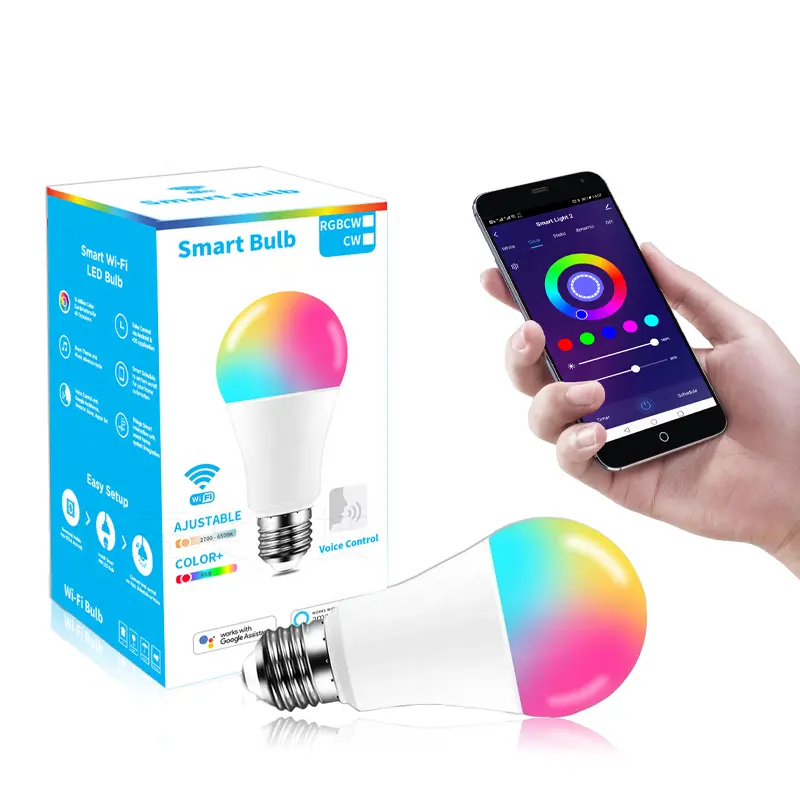
A WiFi smart bulb E27 is the cheapest way to put a light on your phone. It goes into an ordinary holder, joins your Wi-Fi on its own with no hub to buy, and appears in the Tuya or Smart Life app.
- Pairing a WiFi smart bulb E27, and what goes wrong
- Where a colour bulb is actually useful
- Timers and schedules, without a hub
- Wi-Fi or Zigbee: which to buy
- One honest note on the figures
16 million colours, and a proper tunable white from 2700K warm to 6500K cool daylight for the rest of the time.
Pairing a WiFi smart bulb E27, and what goes wrong
Screw the bulb in, switch on, and it flashes to say it is ready to pair. The Smart Life app finds it and the whole job takes about two minutes.
It needs the 2.4GHz band. Like almost every Wi-Fi smart bulb, it cannot see a 5GHz network. If your router publishes both bands under one name, that is the reason pairing fails, and splitting the bands or temporarily turning off 5GHz fixes it. This catches more people than any other problem with these bulbs.
Where a colour bulb is actually useful
The colours sell the bulb and the tunable white is what gets used. 2700K warm in a sitting room in the evening, 6500K cool daylight in a kitchen or over a desk, from the same fitting.
The genuinely useful colour applications are narrower: a porch or gate light in a colour nobody else has, a child's room, a reading corner, or a room that gets used for gatherings. Buying colour for a corridor is money that does nothing.
Timers and schedules, without a hub
A porch light that comes on at dusk and goes off at midnight without anybody touching a switch is the automation people actually keep. It runs from the app with nothing else bought.
Countdowns work too, which is useful for a store room light that somebody always leaves on. Amazon Alexa and Google Assistant work once the bulb is added.
Wi-Fi or Zigbee: which to buy
This one is Wi-Fi, and for one bulb or three that is the right choice because there is no gateway to buy.
Past about eight or ten smart devices, Wi-Fi starts to crowd a home router, and that is where the Zigbee version becomes the better answer: it needs a gateway, but it takes no router slots and every bulb strengthens the mesh.
One honest note on the figures
Wattage and lumen figures vary between production batches on this bulb. It is unbranded stock, and rather than publish a number that may not match the one in the box, we will read the label on the bulb we actually have.
Ask before ordering if the exact output matters, for example if you are matching it to existing bulbs in the same room. For a bulb with published, guaranteed figures and a manufacturer behind it, the Philips Hue range is the alternative. You will want Smart Life installed before the bulb arrives; it is a free download from Google Play.
Uses the Tuya and Smart Life apps
 Tuya
Tuya- Smart Life
Description supplied by the manufacturer.
Specifications
| Type | Wi-Fi RGB and tunable white smart bulb |
|---|---|
| Fitting | E27 screw |
| Colours | 16 million |
| White range | 2700 K to 6500 K |
| Network | Wi-Fi 2.4 GHz. 5 GHz is not supported. |
| Hub or gateway | Not needed |
| App | Tuya or Smart Life |
| Voice control | Amazon Alexa, Google Assistant |
| Dimmable | Yes, from the app |
| Timers | Schedules and countdowns in the app |
| Wattage and lumens | These vary between production batches. Ask us and we will read the figures off the bulb in stock. |
| Subscription | None |
| Product code | 0029 |
| Category | Lighting & Bulbs |
| Availability | In stock in Dar es Salaam |
What’s in the box
- ✓1 x Wi-Fi smart bulb, E27
- ✓User manual
Questions
Do I need a hub or gateway?
No. This bulb joins your Wi-Fi by itself. That is the difference between it and the Zigbee bulb, which is cheaper to run in numbers but needs a gateway first.
Why will it not connect to my Wi-Fi?
Almost always the 5 GHz band. Smart bulbs of this type only join 2.4 GHz. If your router broadcasts both under one name, split them or turn 5 GHz off while pairing, then turn it back on.
How many can I put on one router?
Each bulb takes its own slot on the network. A handful is fine. Once you are into a dozen or more lights, Zigbee bulbs on a gateway are the better way to build it.
Will it remember its setting after a power cut?
It comes back on when power returns and reconnects on its own. You can set what it does at power on in the app.
Will it fit my lamp?
E27 is the common large screw fitting, so it goes into most pendants, table lamps and holders here without an adapter.
Anything else? Ask us on WhatsApp and we will tell you straight.
From the same shelf
All Lighting & Bulbs →You might also want




Lighting & Bulbs
Govee Immersion Pro Kit TV Backlights with Camera + Sidelights
Sh 600,000.00
In stockRead More