
Lighting & Bulbs  Ask about this on WhatsApp

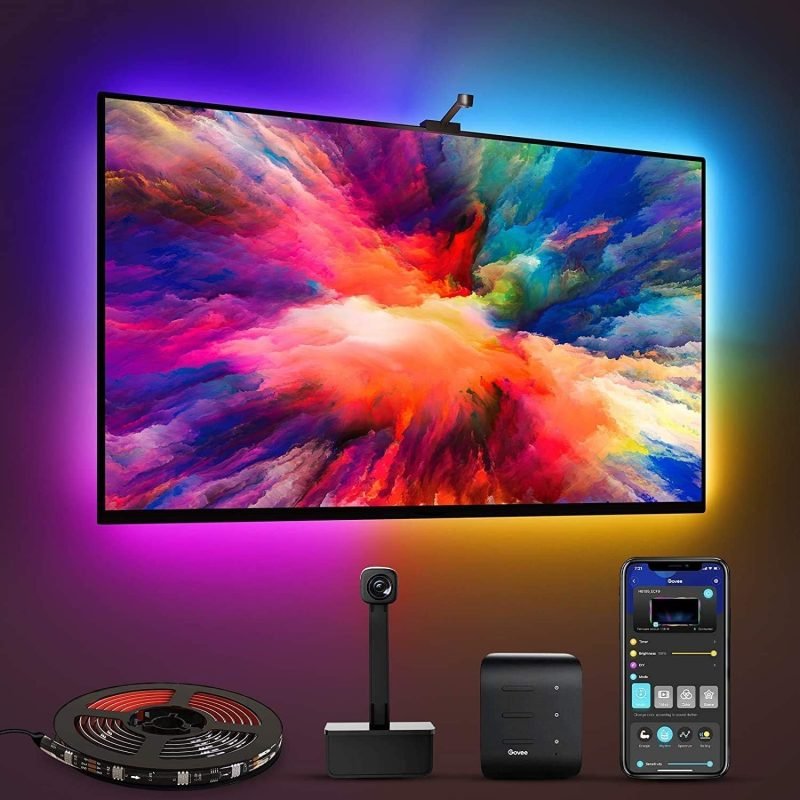
Govee Immersion WiFi TV LED Backlights with Camera
Product code 1054
Sh 400,000.00
In stock in Dar es Salaam
In stock
- Genuine stock. Sourced from authorised distributors, warranty intact.
- Delivered across Tanzania with additional delivery charges.
- Multiple payment options.
Payment Options
- Cash on Delivery. You can pay cash at our store on pickup, or pay the rider upon delivery (Dar es Salaam only).
- Pay by Lipa Number
- M-Pesa

- Mixx by Yas

- Airtel Money

- Halopesa

- Selcom

- M-Pesa
- Pay by Card
- Visa

- Mastercard
- American Express

- Discover

- UnionPay

- Visa
- Pay by Apple Pay or Google Pay
- Apple Pay

- Google Pay
- Apple Pay
55-65 inch
Television size
Camera
Follows the picture
RGBIC
Many colours at once
Wi-Fi
Alexa and Google
Any source
Decoder, console or app
About this product
The Govee Immersion TV backlight is an RGBIC strip that sticks around the back of a television, with a camera that makes it follow the picture.
- Why a Govee Immersion TV backlight is easier on the eyes
- The camera means the source does not matter
- RGBIC, not plain RGB
- Fitting it, and getting the size right
- The other two options
Why a Govee Immersion TV backlight is easier on the eyes
A bright picture in a dark room is the reason your eyes ache after two hours. The pupil keeps adjusting between the screen and the black wall around it.
The Govee Immersion TV backlight fixes that by lighting the wall to roughly match what is on screen. Dark scenes go dim and blue, a sunset spills orange behind the set, and the picture stops being a bright rectangle floating in nothing.
The camera means the source does not matter
The camera clips above the screen and is set up once with the calibration squares in the box. After that it simply watches the picture.
Because it reads the image rather than an HDMI cable, it does not care where the picture comes from. A decoder, a console, a streaming stick, a DVD player or an app built into the television all behave the same, and nothing has to be rewired through a box.
RGBIC, not plain RGB
The strip is divided into segments that each hold their own colour, so several colours run along it at once.
That is the whole point on a television. A plain RGB strip shows one colour at a time, which cannot represent a picture at all. RGBIC is why the left side of the strip can be green while the top is blue.
Fitting it, and getting the size right
The strip comes as four adhesive-backed segments, two of 70cm and two of 120cm, joined at the corners on the back of the screen.
It is sized for 55 to 65 inch televisions. Measure yours before ordering. Clean the back of the screen with the wipe supplied before sticking anything down, because the adhesive gets one attempt and the back of a television is usually dusty.
The other two options
This is the middle kit. It runs on Wi-Fi and Bluetooth through the Govee Home app, works with Alexa and Google Assistant, has a music mode, and carries no subscription.
If you want colour spilling sideways into the room as well as behind the screen, the Immersion Pro kit adds two light bars driven by the same camera. If you want bars alone rather than a strip, the Flow Pro bars come with their own. Govee list the range at govee.com.
Description supplied by the manufacturer.
Specifications
| Type | RGBIC television backlight with camera |
|---|---|
| Model | H6199 |
| Television size | 55 to 65 inch |
| Strip | Four segments, 2 x 70 cm and 2 x 120 cm |
| Camera | 1080p, colour matched to the screen |
| Colour | RGBIC, several colours at once along the strip |
| Network | Wi-Fi and Bluetooth |
| App | Govee Home |
| Voice control | Amazon Alexa, Google Assistant |
| Music mode | Yes |
| Fitting | Adhesive backed, corner segments join at the back of the screen |
| Subscription | None |
| Product code | 1054 |
| Category | Lighting & Bulbs |
| Availability | In stock in Dar es Salaam |
What’s in the box
- ✓LED strip segments
- ✓1080p screen sync camera
- ✓Control box
- ✓Power adapter
- ✓User manual
Questions
Will it fit my television?
The strip is cut into four segments for 55 to 65 inch screens. Tell us your size and we will confirm before you order.
Does it work with the apps built into my smart TV?
Yes. The camera watches the screen itself, so it does not care what is producing the picture. Netflix from inside the television works exactly the same as a decoder or a console.
What is the difference between this and the Pro kit?
The Pro kit adds two light bars for either side of the television. This one is the backlight strip and the camera.
How do I set the camera up?
It clips above the screen, and you stick the calibration squares on the corners once so it learns where the picture is. Then the squares come off.
Do I need a hub?
No. It joins your Wi-Fi and runs from the Govee Home app, with Alexa and Google available once set up.
Anything else? Ask us on WhatsApp and we will tell you straight.
From the same shelf
All Lighting & Bulbs →You might also want



Lighting & Bulbs
Govee Immersion Pro Kit TV Backlights with Camera + Sidelights
Sh 600,000.00
In stockRead More
