



Accessories  Ask about this on WhatsApp

Zigbee Repeater
Product code 1559
Sh 100,000.00
In stock in Dar es Salaam
In stock
- Genuine stock. Sourced from authorised distributors, warranty intact.
- Delivered across Tanzania with additional delivery charges.
- Multiple payment options.
Payment Options
- Cash on Delivery. You can pay cash at our store on pickup, or pay the rider upon delivery (Dar es Salaam only).
- Pay by Lipa Number
- M-Pesa

- Mixx by Yas

- Airtel Money

- Halopesa

- Selcom

- M-Pesa
- Pay by Card
- Visa

- Mastercard

- American Express

- Discover

- UnionPay

- Visa
- Pay by Apple Pay or Google Pay
- Apple Pay

- Google Pay

- Apple Pay
20 to 30 m
Extra reach for the network
USB
Runs off any USB power source
Zigbee
Repeats the mesh, not Wi-Fi
App
Adds, resets and renames like any device
Group control
Works with Zigbee grouping
About this product
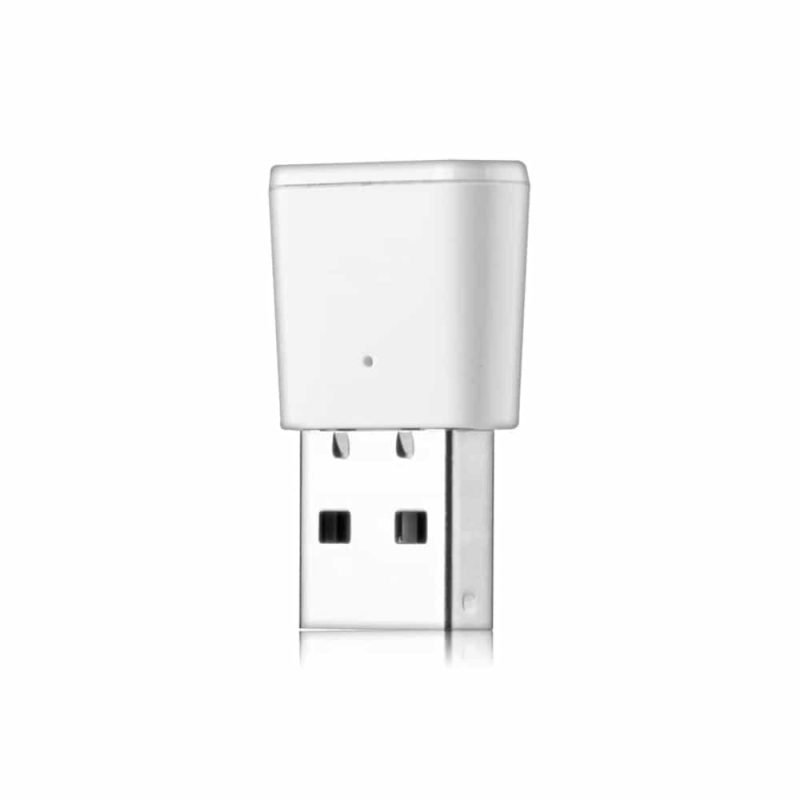
A Zigbee repeater that pushes the network further into the building. Small and USB powered, it that sits between your Zigbee gateway and the devices at the edge of its range, taking the signal on another 20 to 30 metres.
- When you need a Zigbee repeater
- Any USB source will run it
- Where to place it
- It behaves like any other Tuya device
- What it needs
When you need a Zigbee repeater
When a sensor in the back room reports sometimes, or a switch at the end of a corridor takes three attempts. Those symptoms look like faulty devices and almost never are: they are devices sitting at the edge of what the gateway can hear. Replacing them changes nothing. Putting a repeater between them and the gateway takes the signal another 20 to 30 metres and the problem stops.
Any USB source will run it
A phone charger, a socket with a USB port built in, the back of a television, or a power bank while you are testing where to put it. That last one is the useful trick: carry it on a power bank, try three positions, see which one fixes the sensor, and only then commit to a socket. It costs nothing to test properly and it saves the usual routine of plugging it in somewhere convenient and hoping.
Where to place it
Roughly halfway between the gateway and the device giving trouble, with as few walls as possible in each direction. Not beside the gateway, where it adds nothing, and not beside the problem device, which is usually already too far from the gateway to be heard. Concrete and steel are what stop Zigbee, so a repeater on the near side of a thick wall is worth more than one two metres further along the same room.
It behaves like any other Tuya device
It adds to the app the same way everything else does, and it can be reset, renamed and used in Zigbee group control alongside the rest of your kit. It also supports third party control, so it is not locked to one app.
What it needs
An existing Zigbee gateway; this extends a network rather than creating one. Ours are the Tuya Zigbee gateway and the version with an IR blaster and Bluetooth.
Worth knowing before you buy one: every mains powered Zigbee device already repeats, so fitting a Zigbee wall switch or a Zigbee relay in the right place does the same job and switches a light as well. On Z-Wave the equivalent part is the Aeotec Range Extender. Zigbee itself is described at csa-iot.org.
Uses the Tuya and Smart Life apps
 Tuya
Tuya- Smart Life
Description supplied by the manufacturer.
Specifications
| Type | Zigbee signal repeater |
|---|---|
| Radio | Zigbee |
| Coverage | 20 to 30 m |
| Power | USB |
| App | Tuya |
| Adds signal for | Tuya Zigbee gateways and devices |
| Functions | Device adding, reset, third party control, Zigbee group control |
| Gateway | Requires an existing Zigbee gateway |
| Product code | 1559 |
| Category | Accessories |
| Availability | In stock in Dar es Salaam |
What’s in the box
- ✓Zigbee repeater
Questions
Where do I plug it in?
Roughly halfway between the gateway and the device that keeps dropping out, in any USB power source.
Does it extend Wi-Fi?
No. It repeats Zigbee only.
Do I still need a gateway?
Yes. The repeater strengthens an existing Zigbee network, it does not replace the gateway.
How far does it reach?
About 20 to 30 m, which depends on the walls and what is between it and the device.
Can I use more than one?
Yes. Each one adds another hop the mesh can route through.
Anything else? Ask us on WhatsApp and we will tell you straight.
From the same shelf
All Accessories →You might also want


