
Hub  Ask about this on WhatsApp

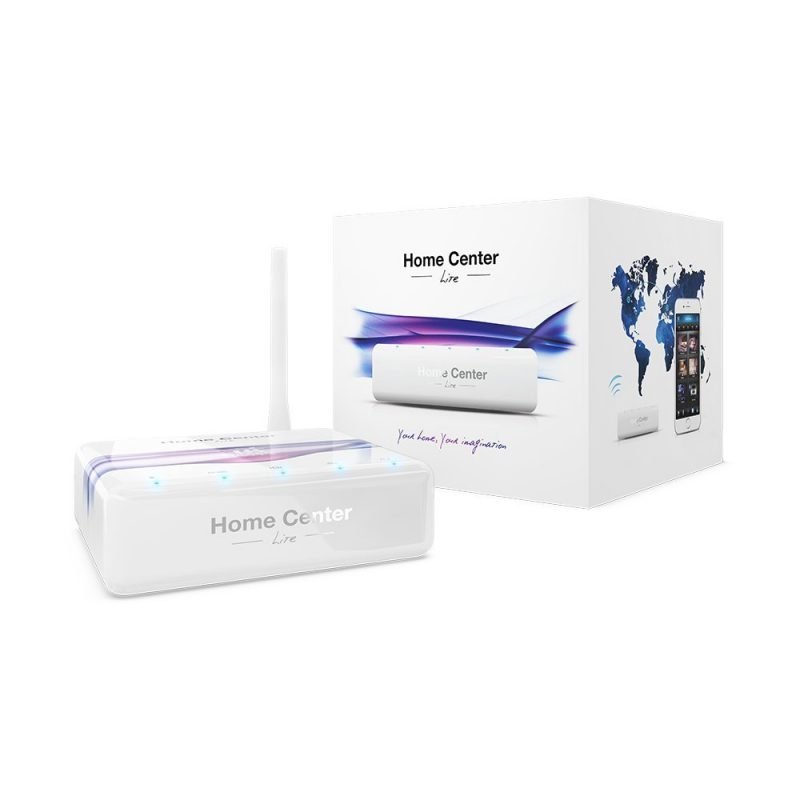
Fibaro HC Lite
Product code 0002
Sh 1,000,000.00
In stock in Dar es Salaam
In stock
- Genuine stock. Sourced from authorised distributors, warranty intact.
- Delivered across Tanzania with additional delivery charges.
- Multiple payment options.
Payment Options
- Cash on Delivery. You can pay cash at our store on pickup, or pay the rider upon delivery (Dar es Salaam only).
- Pay by Lipa Number
- M-Pesa

- Mixx by Yas

- Airtel Money

- Halopesa

- Selcom

- M-Pesa
- Pay by Card
- Visa

- Mastercard
- American Express

- Discover

- UnionPay

- Visa
- Pay by Apple Pay or Google Pay
- Apple Pay

- Google Pay

- Apple Pay
230
Z-Wave devices
Z-Wave
868 MHz for Europe
90 mm
Square, 33 mm tall
Ethernet
Straight to your router
No subscription
Runs on the box
About this product
The Fibaro Home Center Lite is the compact controller: a 90mm square that plugs into your router and runs a Z-Wave house from a shelf.
- The Fibaro Home Center Lite runs a whole Z-Wave house
- Scenes built by dragging blocks
- The app for using it, the browser for building it
- The one thing to know against the Home Center 2
- What it does not need
The Fibaro Home Center Lite runs a whole Z-Wave house
The Fibaro Home Center Lite handles up to 230 Z-Wave devices, which is far more than most houses will ever fit, out of a square the size of a coaster.
Sensors, dimmers, relays, blinds, locks and thermostats all report to it and can act on each other, rather than each sitting alone in its own app waiting to be opened. It draws very little power and is designed to go on a shelf and be forgotten.
Scenes built by dragging blocks
Fibaro's interface is the reason people buy the brand. An evening routine that dims the lounge, closes the blinds and arms the sensors takes a few minutes to assemble and involves writing nothing at all.
Geolocation lets the house react to people arriving and leaving, so the routine can fire on the gate opening rather than on a clock.
The app for using it, the browser for building it
Daily use lives in the Fibaro app on iPhone and Android: turning things on, checking a sensor, running a scene.
The real configuration happens in the browser interface on the local network, which is far more capable than the app and is where anyone setting the system up will spend their time.
The one thing to know against the Home Center 2
LUA scripting is not on this model. It is a Home Center 2 feature, and it is the single functional difference that matters between the two.
If block-based scenes cover what you want to build, the Lite does the same job in a much smaller box. If you want to write conditions, loops and virtual devices yourself, you need the larger controller and there is no way around it.
What it does not need
Everything runs on the box itself rather than in somebody's cloud, so automations keep working through an internet outage and nothing is waiting on a server to respond. There is no subscription attached to any of it.
It has a single 10/100 ethernet port and no USB or VGA, which is the trade for the size. If you need LUA, the ports or the processing headroom, that is the Home Center 2. If the house is not purely Z-Wave, a multi-protocol hub such as the Homey covers more radios. Fibaro publish their range at fibaro.com.
Description supplied by the manufacturer.
Specifications
| Model | Fibaro Home Center Lite |
|---|---|
| Protocol | Z-Wave |
| Frequency | 868.4 and 869.85 MHz for Europe. Other regional variants exist. |
| Device limit | Up to 230 Z-Wave devices |
| Processor | ARM Cortex-A8, 720 MHz |
| Storage | 128 MB SLC flash |
| Ports | One 10/100 ethernet. No USB and no VGA. |
| Scene building | Block-based drag and drop |
| LUA scripting | Not on this model. That is a Home Center 2 feature. |
| Interface | Fibaro app for iOS and Android, plus a browser interface |
| Geolocation | Yes |
| Power | 9 to 12 V DC, adapter supplied |
| Dimensions | 90 × 90 × 33 mm |
| Subscription | None |
| Product code | 0002 |
| Category | Hub |
| Availability | In stock in Dar es Salaam |
What’s in the box
- ✓Home Center Lite
- ✓AC/DC adapter
- ✓Ethernet cable
- ✓Antenna
Questions
How many devices will it take?
Up to 230 on the Z-Wave network, which is more than almost any house will use. Sensors, dimmers, relays, blind motors, locks and thermostats all sit on the same controller and can be made to work together.
Do I need to know how to program?
No. Scenes are built by dragging blocks together in the interface, so a routine that dims the lights, closes the blinds and arms the sensors is a few minutes' work. If you would rather write proper scripts, the Home Center 2 adds LUA and this one does not.
How do I control it?
The Fibaro app on iPhone or Android for day to day use, and any web browser on the network for the deeper configuration. Most people set it up in the browser and live in the app afterwards.
Is there a monthly fee?
No. It runs on the box in your house and there is nothing to subscribe to.
What should I check before buying?
That your Z-Wave devices are on the same frequency band. Ours is the European 868 MHz version, and Z-Wave kit bought in the United States runs on a different band and will not pair. Tell us what you already own and we will confirm.
Anything else? Ask us on WhatsApp and we will tell you straight.
From the same shelf
All Hub →You might also want


