


 Out of stock
Accessories 

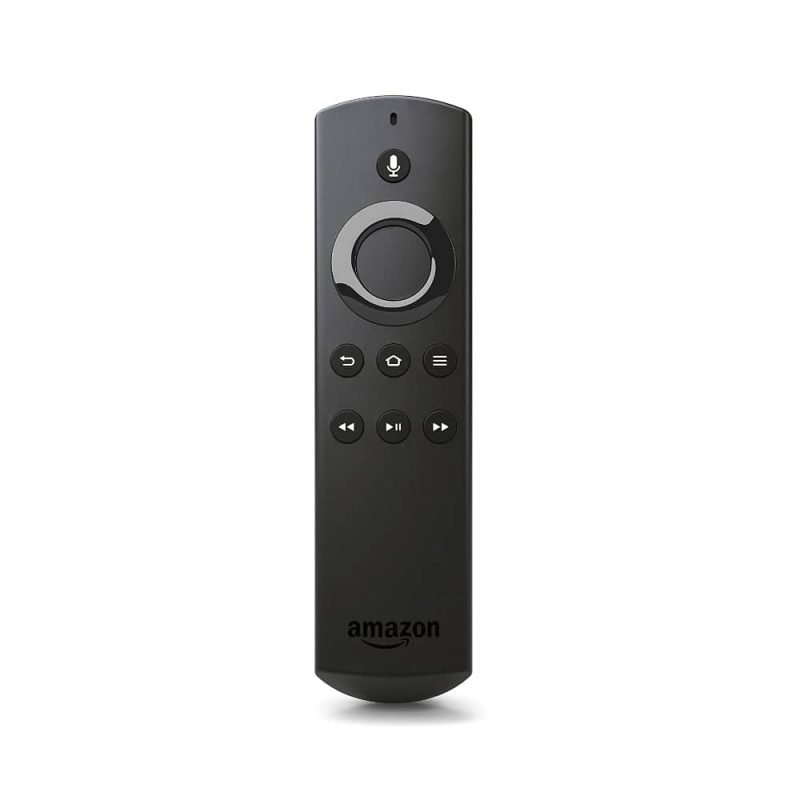
Amazon Firestick - Spare Remote Only
Product code 0223
Sh 100,000.00
Out of stock right now
We are out of this one at the moment. Message us and we will tell you what the lead time is, or what else does the same job.
Ask us when it is back See what else is in stock- Genuine stock. Sourced from authorised distributors, warranty intact.
- Delivered across Tanzania with additional delivery charges.
- Multiple payment options.
Payment Options
- Cash on Delivery. You can pay cash at our store on pickup, or pay the rider upon delivery (Dar es Salaam only).
- Pay by Lipa Number
- M-Pesa

- Mixx by Yas

- Airtel Money

- Halopesa

- Selcom

- M-Pesa
- Pay by Card
- Visa

- Mastercard

- American Express

- Discover

- UnionPay

- Visa
- Pay by Apple Pay or Google Pay
- Apple Pay

- Google Pay

- Apple Pay
Voice
Hold the mic button and say what you want
Bluetooth
No need to point it at the stick
Ring pad
Navigation and select
Playback
Rewind, play, pause, fast forward
AAA
Two batteries, easy to replace
About this product
A replacement Fire TV Stick remote. Remotes get sat on, dropped behind the sofa and taken by children. This is the same Alexa Voice Remote, on its own, so a working Fire TV Stick does not become a paperweight.
- A Fire TV Stick remote on its own, because remotes disappear
- Bluetooth, so the stick can stay hidden
- What the buttons do
- Buy the batteries with it
- What it works with
A Fire TV Stick remote on its own, because remotes disappear
They get sat on, dropped behind a sofa, taken to a bedroom by somebody who never brings it back, and occasionally posted into a gap in the furniture by a small child. A Fire TV Stick without its remote is not a broken Fire TV Stick, it is a working one you cannot operate, and this is the part that fixes that for a fraction of what a new stick costs.
Bluetooth, so the stick can stay hidden
It pairs over Bluetooth rather than infrared, which means it does not have to be pointed at anything. The stick can sit behind the television, in the cable channel, or tucked into the wall bracket, and the remote still works from anywhere in the room. That is also why it works when somebody is standing in front of the screen.
What the buttons do
The microphone button at the top is voice search: hold it, say a title, an actor or a genre, and Fire TV goes and finds it. Below that, the navigation ring with select in the middle, then back, home and menu, then rewind, play and pause, and fast forward. Nothing to learn if you have used one before.
Buy the batteries with it
It takes two AAA cells and they are not included, which catches people out on the evening the old remote finally disappears. Add a pack at the same time rather than discovering it at eight o clock.
What it works with
Amazon Fire TV and the Fire TV Stick range: the Fire Stick, the Fire Stick 4K and the 4K Max.
Note that the Fire TV Stick Lite ships with the Lite remote, which has no TV power or volume keys; this is the standard Alexa Voice Remote. We stock AAA batteries if you need a set. Wikipedia keeps the Fire TV range history.
Description supplied by the manufacturer.
Specifications
| Type | Alexa Voice Remote, replacement |
|---|---|
| For | Amazon Fire TV and Fire TV Stick |
| Connection | Bluetooth |
| Voice | Microphone button for Alexa voice search |
| Buttons | Navigation ring and select, back, home, menu, rewind, play and pause, fast forward |
| Line of sight | Not required, works with the stick hidden |
| Power | 2 x AAA batteries |
| Batteries | Not included |
| Product code | 0223 |
| Category | Accessories |
| Availability | Out of stock - ask us for the lead time |
What’s in the box
- ✓Alexa Voice Remote
Questions
Will it work with my Fire TV Stick?
It is the Alexa Voice Remote for Amazon Fire TV and Fire TV Stick. Pair it from the Fire TV settings under controllers.
How do I pair it?
On the Fire TV go to Settings, then Controllers and Bluetooth Devices, then Amazon Fire TV Remotes, and add a new remote. Hold the home button on this remote until it is found.
Does it control my television volume?
No. This remote has no volume or power buttons, so the television keeps its own remote for those.
Does it need batteries?
Yes, two AAA batteries, and they are not included.
Do I have to point it at the stick?
No. It uses Bluetooth, so the Fire TV Stick can stay tucked behind the screen.
Anything else? Ask us on WhatsApp and we will tell you straight.
From the same shelf
All Accessories →You might also want


